

What is a MikroTik license?
MikroTik groups access to RouterOS features by license level, from 0 to 6. Note that level 0 only lets you use RouterOS for 24 hours, at limited speed.
Buying an official MikroTik license
You can buy an official license from the MikroTik website and use it after you buy an Iran VPS. Below we explain how to activate it.
License levels
With a simple sign-up on the MikroTik website you can get a level 1 license and start using MikroTik, although higher levels unlock more features.
- Level 0: when you buy an Iran MikroTik server, MikroTik gives you full access for 24 hours. After that, your access is blocked.
- Level 1: a demo license that lets you get to know and work with MikroTik. You can get it by following the steps below.
- Level 3: the baseline for all MikroTik products; you could say real use of MikroTik features starts at level 3. (When buying MikroTik routers, check the license type to avoid extra costs.)
- Level 4: includes everything in the lower levels, and for wireless it lets you use MikroTik devices as the central point of point-to-multipoint links. Concurrent HotSpot users also go up from 1 to 200. Some MikroTik products ship with this license by default.
- Levels 5 and 6: the same features as the previous levels; the differences are in limits such as the number of admin users and connections.
Getting a level 1 license
To get a level 1 license, go to mikrotik.com and create an account in the Account section with your email address. The email and password you sign up with are what activate your license.
Activating the license
Next, sign in to your MikroTik VPS and open System > License from the left-hand menu (as shown below).
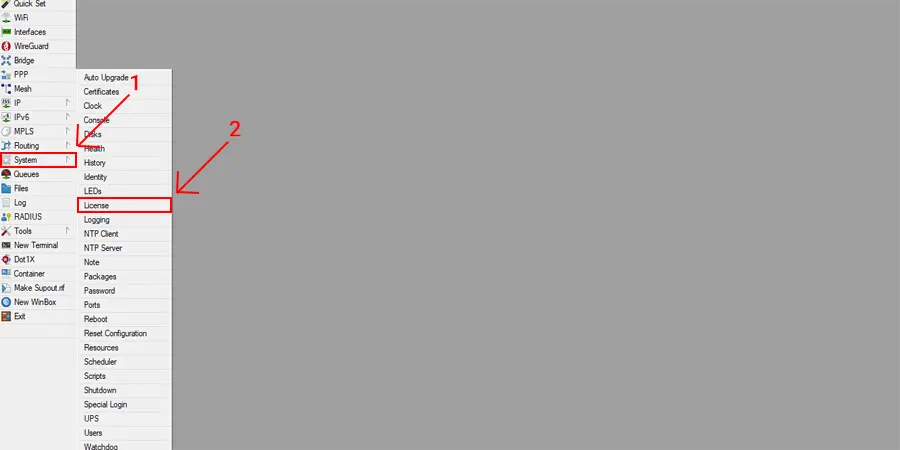
Click Renew License. In the new window, enter the email you signed up with in the Account field, your MikroTik account password in the Password field, and set Level to p1. You should see a result like the one below.

What all MikroTik licenses have in common
- They never expire.
- They work on all interfaces.
- You can upgrade to every new RouterOS release, right up to the latest, without restrictions.
Final notes
Level 2 licenses are old and discontinued; to go beyond level 1 you need to buy a higher level. In general, any MikroTik product or MikroTik VPS needs a license.
A fresh RouterOS installation has a level 0 license, so you need to get a higher license within 24 hours.
Thanks for following this guide. Follow Mizbandade for more.